Best practices for using IT Glue
IT Glue is a powerful organizational tool designed to centralize IT documentation, improve team collaboration, and streamline workflows. Whether you are new to IT Glue or a long-time user looking to optimize your documentation processes, this guide will help you understand best practices for using the platform efficiently while avoiding common pitfalls. Applying these best practices will help you maintain security, improve operational efficiency, and support long-term success.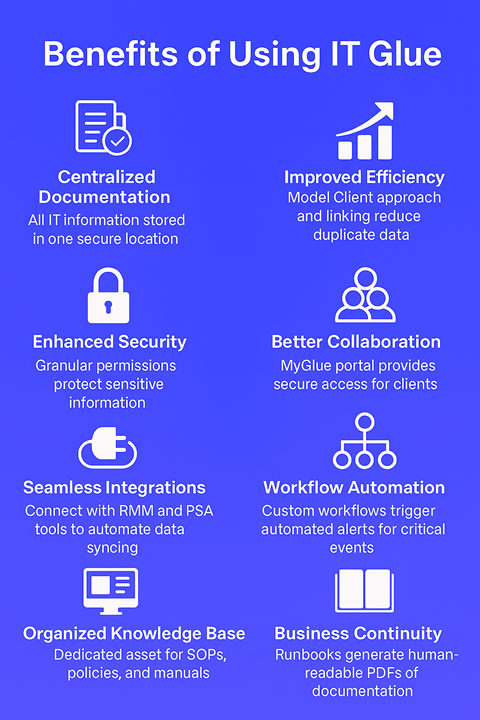
IT Glue guiding principles
These principles apply throughout the platform:
- Start with core assets and integrations before documentation.
- Design asset types for reuse across all organizations.
- Structured data belongs in assets, not documents.
- Link data instead of duplicating it.
- Apply the least privilege security model.
Keep these rules in mind as you work through the following sections.
Section 1: Learning the fundamentals of IT Glue
By the end of this section, you will understand how IT Glue is structured, have a repeatable approach for documenting your first organization, and know how to plan your integrations.
Understanding IT Glue's data structure
IT Glue organizes information using modular, linkable components. Understanding this structure is essential for creating documentation that is maintainable and scalable.
 Organizations
Organizations are the top of the data structure in IT Glue, representing one of the following:
- For MSPs, organizations typically represent clients.
- For internal IT teams, organizations typically represent departments or business units.
All assets exist within organizations. Asset types are shared globally across all organizations.
 Best practices
- Treat your first organization as a template.
- Keep naming conventions consistent across organizations.
 Resources
Asset types
Asset types define how data is structured and stored in organizations in IT Glue. Each asset type represents a single, logical bucket of data that can be linked to other data.
Assets are individual records created from asset types. Each asset represents a specific, real-world item or piece of information, such as a Windows server or a domain administrator password.
Core assets
Core assets are foundational asset types, including the following:
Core assets are targets for integrations (RMM, PSA), power extended platform features, and serve as the primary linking targets for other assets.
Passwords: general vs. embedded
Passwords are a type of core asset that can be created as general or embedded. Understanding the difference between these password types helps you choose the right option for each use case.
The following table summarizes when either type of password should be used:
| General Passwords | Embedded Passwords |
|---|---|
| Credentials apply to multiple assets. | Credentials apply to one asset only. |
| You need granular security controls. | Independent security settings (separate from the parent asset settings) are not required. |
| You want to use a vaulted or personal password. | A vaulted or personal password is not needed. NOTE These features aren't supported for this password type. |
| Linking to other assets is required. | Linking to other assets is unnecessary. |
Best practices
- Do not modify core asset field structures.
- Populate core assets early in the deployment process.
- Allow integrations to create and maintain core asset data when possible.
- Avoid using core assets for procedural or descriptive content.
- Default to general passwords unless embedded passwords are clearly appropriate.
Resource
Flexible assets
Flexible assets allow customization beyond core assets and can be modified or created from scratch. You can create entirely new asset types in IT Glue by designing additional flexible asset templates.
Best practices
- Import default flexible asset templates as examples.
- Modify templates before using them in production.
- Create asset types that work across all organizations.
TIP If data doesn’t fit a core or flexible asset, it likely belongs in documents or requires a new flexible asset type.
Resources
- Quick guide for flexible assets
- List of flexible asset templates
- If you haven’t completed the IT Glue Deployment Guide’s Apps & Services course, start familiarizing yourself by importing the default flexible asset types to use as examples.
Documenting your first organization
Your first organization establishes patterns you will reuse when setting up future organizations. Establishing a consistent, repeatable structure for all organizations simplifies future deployments, allowing for subsequent organizations to become a source for data entry rather than design.
Step 1: Start with core assets and integrations
Core assets are the building blocks of your documentation in IT Glue. Populating core assets first makes them immediately available for linking within flexible assets and documents as documentation expands.
Core integrations, such as RMM and PSA, should also be implemented early, and for new customers, it is recommended that they be implemented in a specific order. Refer to Integrating Autotask, Datto RMM, and IT Glue.
These integrations accelerate deployment, reduce manual data entry, and introduce automation. They also populate and maintain core asset data, which improves accuracy and consistency.
Best practices
- Avoid creating documents too early.
- Procedural documentation should be introduced only after assets are established to prevent data from being stored in the wrong place.
Step 2: Build and validate flexible assets
Flexible assets are customizable and should be validated using real production data before full deployment.
To import default templates, navigate to Admin > Flexible Asset Types > Import From Template > Select All > Import.
Best practices
- Create at least one asset from each flexible asset type to confirm that the template structure supports operational needs. For guidance, refer to Hands-on exercise: Creating a flexible asset type in Section 2 of this guide.
- Identify required changes before templates are used at scale.
Step 3: Introduce procedural documentation and checklists
Procedural documentation includes Standard Operating Procedures (SOPs), knowledge base articles, manuals, standards guides, and so forth. This content should be maintained in documents, with checklists used to support execution and consistency.
Best practices
- Both new and existing users can leverage the Smart SOP Generator to make the documentation process easier.
- Create reusable checklist templates and link them to the relevant documents.
- Develop documentation and checklists together or immediately after documents are established to ensure alignment and consistency.
Procedural documentation in Section 2 and Checklist management in Section 3 provide more details on this step.
Step 4: Complete administrative setup
Once assets and documentation are in place, you can begin administrative configuration, including the following:
- Adding users.
- Defining groups and permissions.
- Establishing asset-level access controls.
- Automating notifications.
Security model in Section 3 provides more details on this step.
Planning for integrations
Integrations play a critical role in automating data creation and maintenance during your IT Glue deployment. The goal is to reduce manual effort while ensuring accurate, up-to-date documentation.
What to consider
Before configuring integrations, consider the following questions:
- Do you use an RMM tool?
- Do you use a PSA tool?
- Do these tools integrate with IT Glue?
- Do they integrate with each other?
- Are you using other Kaseya tools that integrate with IT Glue?
- Are you using third-party tools (for example, open API integrations, Liongard Roar, Warranty Master/ScalePad, Quickpass, and so forth)?
Your answers determine the most appropriate synchronization method and integration strategy.
Best practices
- Enable integrations early.
- Allow integrations to manage core asset data whenever possible to reduce duplication and maintenance overhead.
Resources
Section 1 key takeaways
- Start with core assets and integrations before moving to flexible assets and documents.
- Focus on one organization and then apply your knowledge when setting up more organizations.
- Leverage IT Glue’s modular structure and linking features to keep documentation organized and maintainable.
- Follow password best practices to ensure security and compliance.
Section 2: Working with flexible assets, linking, and documents
Once you have a basic understanding of the fundamentals from Section 1, learn how to design scalable asset types, link data effectively, and create maintainable documentation. The goal is to eliminate duplication, reduce complexity, and simplify long-term maintenance.
Hands-on exercise: Creating a flexible asset type
The following exercise is intended to help you become familiar with flexible asset behavior and inform future template design decisions.
To practice flexible asset design in an IT Glue account, a user with the Administrator or Manager role can create a flexible asset type to use for testing as follows:
- In the top navigation menu, click Admin.
- In the left navigation menu, click Flexible Asset Types.
- In the upper-right corner of the page, click New.
- Add four new fields and configure their attributes.
- From the Kind drop-down menu for one field, select Tag, which will help you learn the difference between tags and related items.
- Delete one of the newly added fields.
- Reposition one field within the form layout.
- Save the asset type.
Next, creating a test asset using this template in a designated practice organization will allow you to evaluate how flexible asset types work and changes you may wish to make.
Best practices
- Use provided templates whenever possible to avoid duplicated effort.
- Leverage Tag fields to pull in data from related assets, promoting consistency and enforceable data requirements.
- Design asset types for use across all organizations.
EXAMPLE A single, universal email asset type is more effective than creating separate types for each email platform.
Resources
Linking
Effective linking reduces document maintenance and prevents data duplication. The following linking methods should be used intentionally based on the relationship being modeled:
Related items
Used for ad hoc relationships between assets.
EXAMPLE Linking a general password to a contact.
Resource
Tag field
Used when asset types are frequently associated and need structured relationships.
EXAMPLE Tagging hardware within a LAN flexible asset.
Resource
@relate feature
Used to embed asset links directly within document content.
EXAMPLE Linking a document named "Secure Printing Policy" in a document named "Printer Configuration Settings."
Resource
Procedural documentation
The documents asset type is used exclusively for procedural documentation, including the following:
- Standard Operating Procedures (SOPs)
- Knowledge base articles
- Manuals
- Policies
- Procedures
- Guidelines
What to consider
You can generate documentation from several types of document features in IT Glue, including the following:
| Feature | Use Case |
|---|---|
| IT Glue native documents | Use as the default format for procedural documentation. |
| GlueFiles | Use for storing reference materials such as PDFs, images, diagrams, and Visio files. |
| Office Cloud Editor | Use when Word, Excel, or PowerPoint formatting is required. |
| Import drop-down menu | Use to migrate existing HTML or Word documentation into IT Glue. |
Best practices
- Do not use documents to store structured or attribute-based data. The following must remain in appropriate asset types, not documents:
- IP addresses
- Phone numbers
- Passwords
- Any configuration or data attributes
- Review storage limitations before uploading large or numerous files.
- Leverage library templates to accelerate documentation creation and standardization.
- Replicate folder structures to preserve organization and reduce cleanup effort.
Resources
Section 2 key takeaways
- Use linking (tags, related items, @relate) to reduce maintenance and duplication.
- Use documents only for procedural content.
- Evaluate all available document types in IT Glue before creating a document. Based on linking needs, edit frequency, and formatting requirements, select the format that best suits your content.
Section 3: Administration
This section outlines best practices for managing administrative features in IT Glue. Keep these concepts and definitions in mind as you familiarize yourself with the most-used options in the Admin menu. This will help you ensure secure access, consistent operations, and long-term maintainability.
Security model
A well-designed security model ensures users have the right level of access (no more, no less) while protecting sensitive information.
Best practices
User-level access
- Review user roles regularly to ensure permissions align with job responsibilities.
- Grant elevated permissions only when required.
- Remove access for inactive users or former employees promptly.
Group-level access
Use groups to manage access at scale, which allows you to control user access to specific organizations and asset types, rather than assigning individual permissions to individual users.
- Design groups around job functions (for example, Help Desk, Network Team, Security Team).
- Assign access at the group level whenever possible.
Asset-level access
Use asset-level permissions sparingly, only when additional restriction is required.
- Reserve for sensitive credentials, security policies, and compliance documentation to reduce complexity and maintenance challenges.
Resource
Workflow automation
Workflows reduce manual effort and improve visibility through automated notifications. Use workflows to alert the appropriate stakeholders when action is required, such as for renewals, reviews, or expirations.
Best practices
- Enable and monitor default workflows for the following:
- SSL certificate expiration
- Domain expiration
- Periodically review workflows to ensure notifications remain relevant and correctly routed.
Resource
Checklist management
Checklists reinforce consistency and accountability when executing tasks.
You can create checklists as the following:
- One-off checklists for ad hoc work
- Reusable templates for standardized processes
Best practices
- Use checklist templates for recurring activities such as onboarding, offboarding, audits, and system changes.
- Pair checklists with SOP documents to clearly define how work should be performed. For each instance of an SOP, create a new checklist from a template to track progress and completion.
Resource
Backup and data continuity
Maintaining continuity and recoverability of documentation is a critical administrative responsibility. Regularly exporting data allows you to maintain secure, off-platform backups as part of your business continuity and disaster recovery strategy. Verify that exported data is stored securely and access is limited to authorized personnel.
Available export options include the following:
- Single asset type from a single organization
- Full organization export
- Full IT Glue account export
Best practices
- Use exports when data needs to be reviewed, modified, or transferred. Common use cases include the following:
- Migrating data to another system
- Performing bulk updates or analysis
- Creating external backups
- Schedule exports periodically and before major changes to reduce risk and prevent data loss.
Resource
Runbook usage
Runbooks provide a consolidated, human-readable snapshot of documentation. Use them to generate PDF compilations of all documentation within an organization to support business continuity during and after disruptive events.
In addition to being able to generate PDF files of all documentation you have in terms of organization, you can also generate a runbook for selected assets. For example, if you want to generate a runbook that will contain only Contacts and Configurations, you can do that either manually or on a scheduled basis.
You can create runbooks for the following:
- Audits and compliance reviews
- Disaster recovery planning
- Customer handoffs or executive summaries
Best practice
- Generate runbooks on a per-organization basis and refresh them regularly to ensure accuracy.
Resource
Section 3 key takeaways
Effective administration in IT Glue depends on the following:
- Disciplined access control.
- Strategic use of automation.
- Consistent checklist practices.
- Proactive data protection.
- Clear documentation outputs like runbooks.


