Microsoft Secure Score
With the Microsoft Integration, you can now view your organization's Microsoft Secure Score directly on the Organization dashboard in IT Glue.
Microsoft Secure Score is a measurement of an organization's security posture, based on how closely its configurations, policies, and user behavior align with Microsoft's security recommendations. A higher score reflects stronger alignment with these recommendations. Bringing this score into IT Glue allows you to view security posture alongside documentation, assets, and other organizational context.
Prerequisites
- An active Microsoft Integration
- The following Graph API Permission:
- SecurityEvents.Read.All(Delegated) with Admin consent
- SecurityEvents.ReadWrite.All API permissions
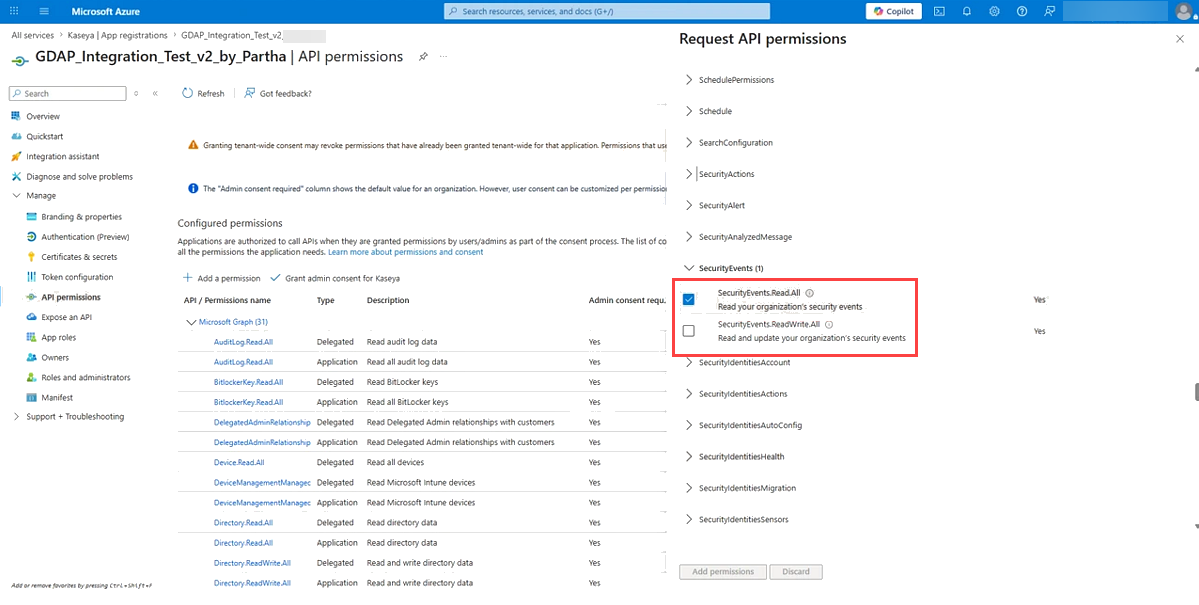
NOTE Depending on your tenant configuration, SecurityEvents.Read.All Aplication permission may also be required.
Gaining access to the Secure Score widget
- Go to your Microsoft Entra admin center and locate the app registration associated with your IT Glue Microsoft Integration. Grant admin consent for the SecurityEvents.Read.All(Delegated) permission.
IMPORTANT Admin consent must be granted by a Microsoft 365 Global Administrator or Privileged Role Administrator. Standard user consent is not sufficient.
- Return to IT Glue and trigger a Microsoft Integration sync
Once a sync has completed, the Microsoft Secure Score widget will appear on the Organization dashboard in place of the setup banner.
NOTE The widget is only visible to users with the Creator role or above.
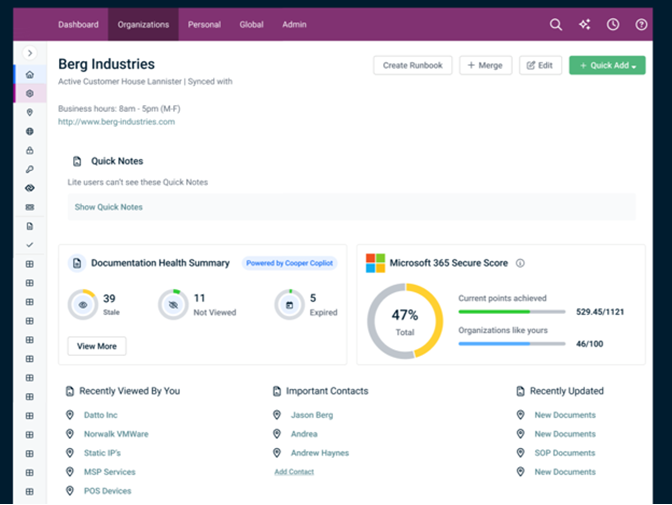
Viewing the Secure Score widget
The Microsoft Secure Score widget on the Organization dashboard displays:
- The organization's Secure Score, shown as a percentage in a donut chart.
- The Current points achieved, shown as a fraction of the maximum possible score.
- Organizations like yours, a comparison score out of 100 based on similar organizations within the same industry.
- A link to view the full Secure Score details directly in the organization's Microsoft account.
General Notes
- The Secure Score widget only displays data for organizations with a successfully synced Microsoft Integration.
- Score data refreshes with each Microsoft sync.
- Removing the required permission does not delete any existing IT Glue documentation or data; it only affects the Secure Score widget's visibility.


